Developer Tools
I Built My Own Task Manager Instead of Opening Obsidian
TL;DR
- One local backlog, every agent. A single SQLite file on disk, wired into Claude Code, Claude Desktop, Cursor, Codex, and celeste-cli over MCP. No sync service in the middle.
- Specs live outside the repo. Plans and specs are stored as documents tagged to a repo by metadata, not by file path — durable across context resets, queryable by the next agent, and out of your git history.
- Pairing, not blind localhost trust. Every client enrolls with a six-digit code and gets its own revocable token. A random website hitting
127.0.0.1gets a 401. - Signed and shippable. A PGP-signed macOS build plus a drop-in agent skill, headed for a public distribution repo when the stable release lands.
Most people would tell you to just use Obsidian. Drop your tasks in a vault, sprinkle some plugins on top, call it done. And sure, that works.
But what's the fun in that?
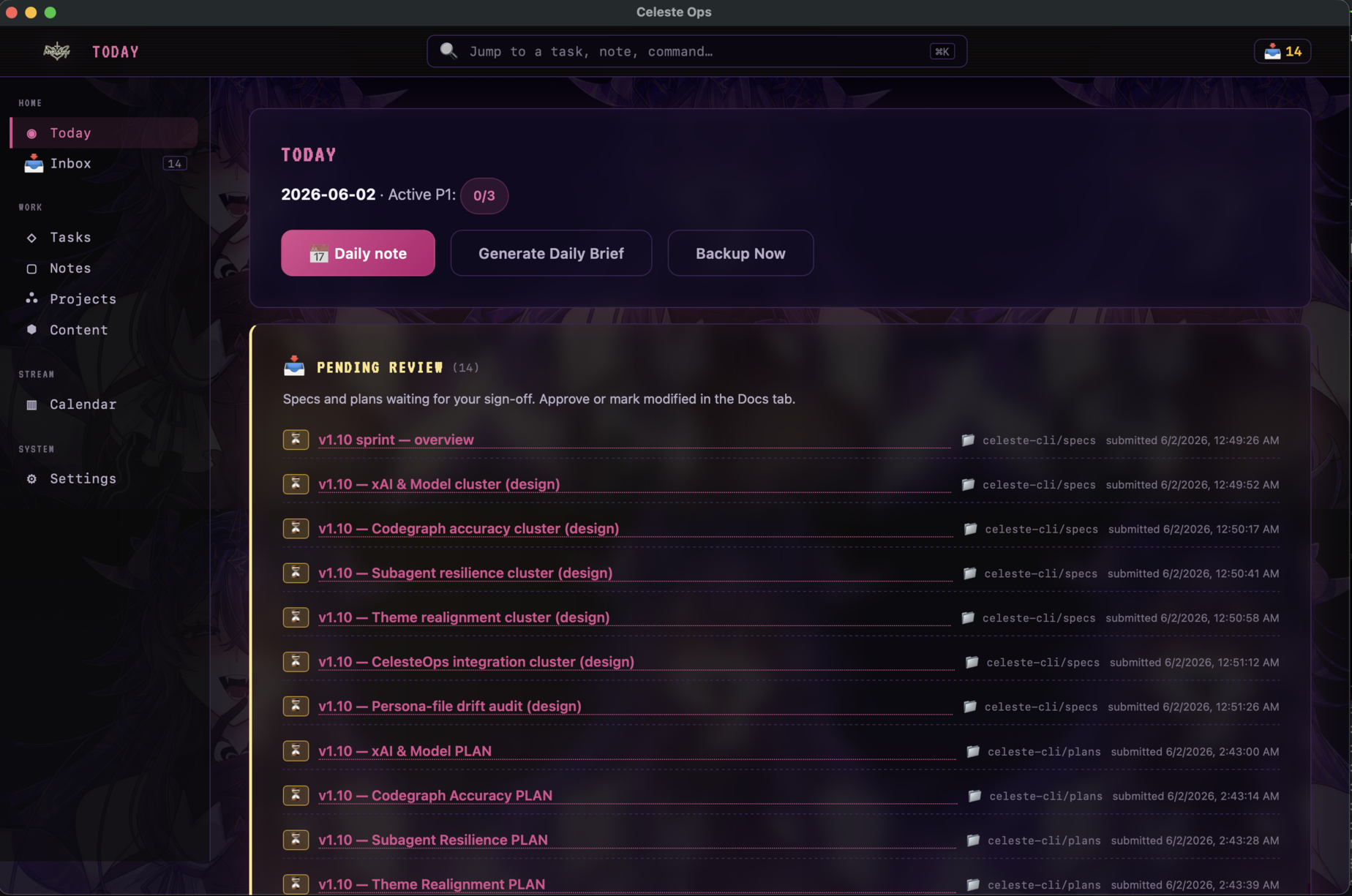
So I built CelesteOps instead: a local-first control panel for everything I run as a creator. It tracks tasks, a content pipeline, a stream calendar, milestones, scheduled posts, and a pile of markdown notes. One macOS app. One SQLite file on disk. One database wired into every agent I run over MCP.
What matters sits under the dashboard. The agents and I share one backlog, so we never wind up with five private copies that drift apart by Thursday.
The actual problem
I have agents drafting specs, writing code, triaging GitHub issues, and queuing posts on my behalf. They need somewhere durable to put that work so I can review it before it ships. They also need somewhere the next agent can read it back.
Slack, GitHub, and Notion all solve a version of this. They also come with auth boundaries, rate limits, and a network round trip for every read. When the work is happening on my laptop, routing the coordination layer through someone else's servers felt backwards.
CelesteOps keeps the loop local. Every task, note, and spec lives in celeste_ops.db on my machine. One MCP server reads and writes it. The desktop UI reads and writes the same file. An agent creates a task over MCP, and a couple seconds later it appears in the sidebar. No sync service in the middle.
The spec problem
This is the one that actually pushed me to build it.
You write a spec or an implementation plan, and where does it go?
Commit it to the repo and you get half-formed thinking in your git history, plans that go stale the day after you write them, and sometimes private strategy you'd rather not ship in public. Leave it out of the repo and it lives nowhere. The moment an agent's context window resets, the plan is gone. A subagent spun up to handle one slice of the work has no idea the plan ever existed, so it re-derives the same decisions or drifts from them.
CelesteOps gives that work a home outside the tree. A spec or plan gets written as a document tagged to the repo by metadata, not by file path: repo: celeste-cli, folder: celeste-cli/specs, review_status: in-review. The next agent reads it back by querying that metadata. The next session picks up where the last one stopped. A subagent asks "what's the current plan for X" and gets the real answer instead of a guess.
That's the abstraction I kept failing to name: tasks, specs, plans, and docs live in a tagged metadata structure any agent can query, sitting alongside the repo instead of inside it. The git tree stays clean. The plan stays durable. And I still hold the approve button.
Many agents, one backlog
It's not just one assistant. The MCP server speaks standard MCP, so Claude Code, Claude Desktop, Cursor, Codex, and celeste-cli all connect to the same database at the same time. Claude Desktop gets a one-click .mcpb extension; the rest wire up through a small config. I can point one agent at a GitHub repo to triage issues and file tasks, hand content iteration to another, and let a third draft specs.
They're not just reading the same list. When one of them changes something in repo A that touches repo B, it files a task tagged for repo B, and the next agent working there picks it up. The backlog doubles as a message board between agents, so a decision made in one session survives into the next one in a different repo with a different model.
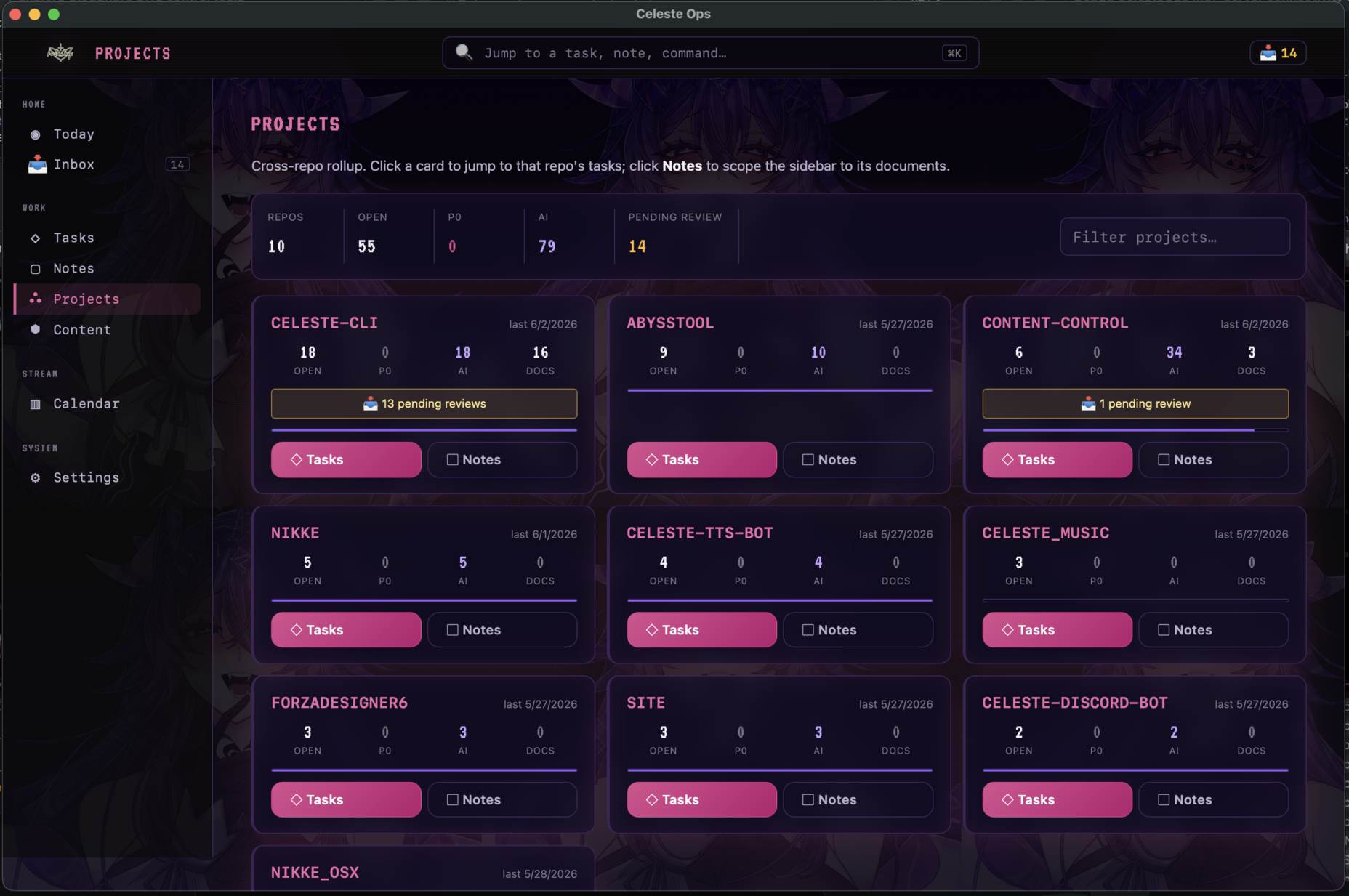
The Projects view is where that pays off. Every repo on one screen, each card showing what's open, what's blocking, how much an agent owns, and how many reviews are waiting on me. The server exposes 56 tools to drive all of it: create a task, move content through the pipeline, attach a doc to a task, schedule a post, generate the morning brief. When any agent asks "what needs attention," the answer comes from the real backlog. I can see what's in flight, what is blocked, and which tasks are mine to clear.
Pairing an agent, not trusting the network
A local app that opens an HTTP port has a problem people forget: a web page you visit can also reach 127.0.0.1. Loopback is not a wall. So I stopped treating "it came from localhost" as a reason to trust a request, and I treat the API as if it were public.
Every LLM client pairs with CelesteOps the way you pair a Bluetooth device. You open Settings → Connections, the app shows a six-digit code on a live countdown, and the client enrolls with it before it lapses. Regenerate it any time. Claude Code, Claude Desktop, Cursor, Codex, celeste-cli: each gets its own token, cops_ followed by 256 bits of random. The token is stored as a SHA-256 hash, never in plaintext, and shown to the client exactly once. The pairing code is the consent: a client that knows it lands approved, and from then on the Connections panel lets me revoke it, rotate it, or set an expiry, the same way I approve a spec.
After enrollment, every request carries that token, and the server checks the token, the Origin, and the Host before it touches the database. A website with no code and no token gets a 401, even if it guesses the port. The app's own UI skips all of this with a token minted fresh in memory each launch, so I never approve myself. Secrets like the R2 key and the backup password sit encrypted at rest behind a macOS Keychain key, and the API hands back a "configured: true" boolean instead of the value.
What it tracks
The sidebar splits into four bands:
- Today / Inbox — top P1 tasks (hard-capped at three a day), what's overdue, what just became unblocked, and a one-click daily brief.
- Tasks / Notes / Projects / Content — a filterable task list with real dependencies, markdown notes with folders and backlinks, a cross-repo rollup, and a content pipeline that runs idea → outline → record → edit → publish → repurpose.
- Calendar — stream days, milestones, and scheduled social posts in month / week / day views.
- Settings — backup config, the Connections panel, and defaults.
Tasks carry a blocked_by list, so "implement the thing" stays quiet until "write the spec" is signed off and marked done. The Tasks view splits three ways: Active for the working list, Archive for what's done, and a dependency Graph that draws the blocker chains so I can see what's gating what. Repo and tag filters autocomplete from the tasks I already have. The Inbox surfaces work the moment its blockers clear, ⌘K runs full-text search (SQLite FTS5) across everything and jumps me straight to the hit, and the rest behaves like a real Mac app: a native menu bar, ⌘S and ⌘P in the editor.
The review workflow is the point
An agent drafts a spec or a plan as a markdown document and flags it in-review. In the Notes tab that document grows two buttons: Approve and Mark Modified. One click flips its status and stamps the time.
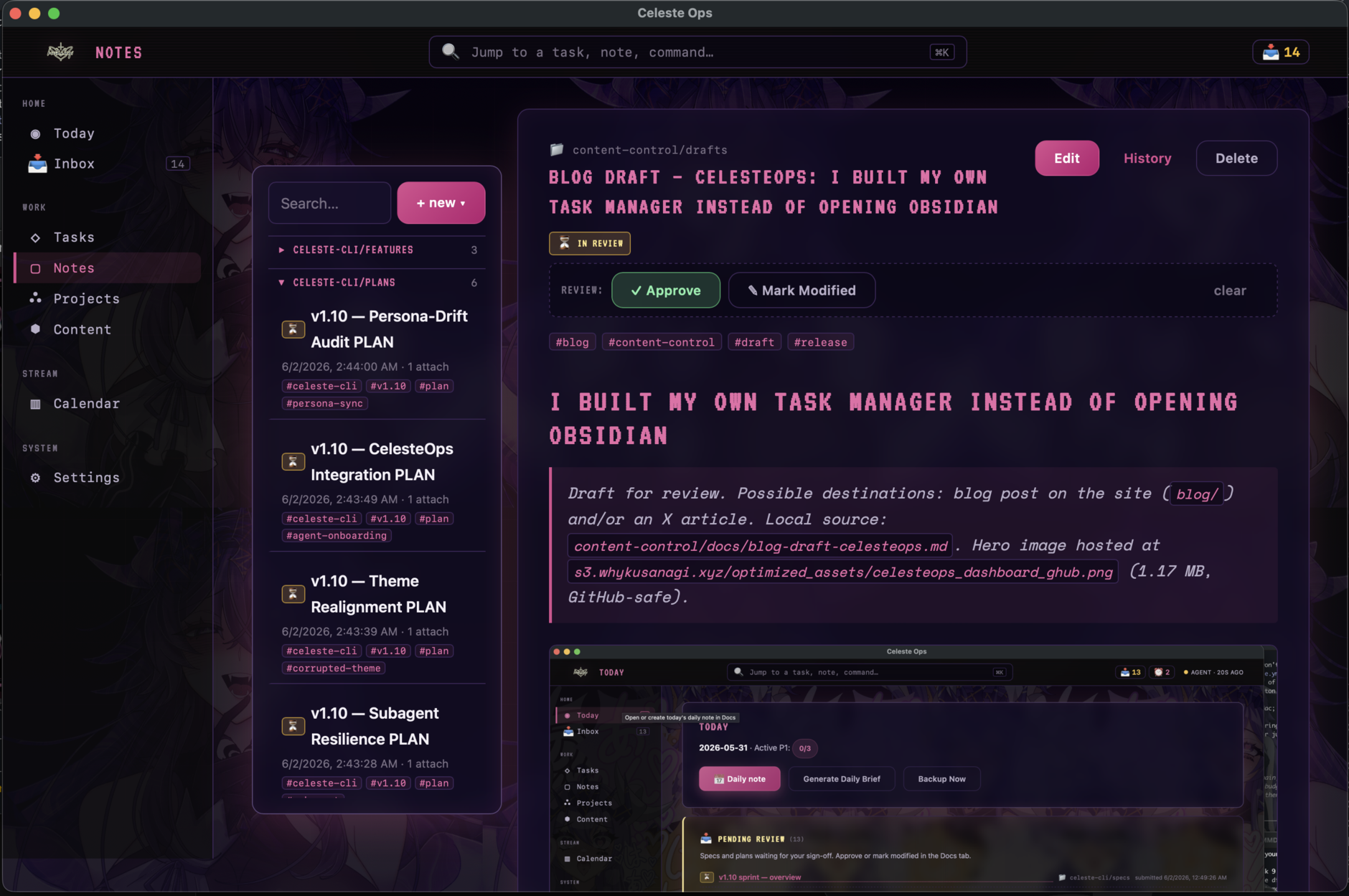
The agent polls for that timestamp and picks up where I left off. I sign off on a spec, the task it blocks moves to done, and the next task slides into my Inbox on its own. If I reopen a spec I'd already approved and change it, the doc flips itself back to "modified," so the agent re-reads before acting on a stale plan. I review in plain English. The plumbing handles itself.
The screenshot above is this post: I drafted it in Celeste's voice, filed it as a document in-review, and I'm reading it back in the same tab where I sign off on everything else. The agents wrote the v1.10 sprint specs overnight. I get to them with coffee.
Local-first, but not stranded
Everything lives on disk and runs offline. No account, no cloud dependency to boot the app.
When I do want a safety net, backups go to a Cloudflare R2 bucket. Each backup is a zip of the database and exports, encrypted with AES-256-GCM from a password I set, with a SHA-256 hash of the plaintext stored alongside it so a restore can verify the data came back intact. The zip strips the secret fields out of settings before it leaves the machine, and every backup gets its own random salt. Off-site copies, still encrypted, still mine. I click Backup now, or an agent calls backup_run_manual, and it's handled.
What ships, and where
The app's source stays in a private repo. The part you actually run lives in a separate public distribution repo, github.com/whykusanagi/celeste-ops. Inside it: the signed macOS app, a pure-Node MCP shim that forwards all 56 tools to the running app, an installer that finds your clients and wires them up, the one-click Claude Desktop extension, the 56-tool reference, and a drop-in skill. The license is proprietary, free to download and run against your own app.
While CelesteOps is in testing, every build is a macOS app bundle signed with my own PGP key. An Apple Developer signed release is a maybe for later, once it's ready to leave testing. The download should carry one signature and no other:
whykusanagi <[email protected]>
9404 90EF 09DA 3132 2BF7 FD83 8758 49AB 1D54 1C55
You verify it before you trust it:
gpg --verify checksums.txt.asc checksums.txt   # expect "Good signature"
shasum -a 256 -c checksums.txt                 # expect "OK"
Good signature plus OK means the zip is authentic and untampered. The running app's build-info panel shows the live version, channel, hash, and signing status, with a link to the verify steps. The trade-off for skipping Apple notarization is a one-time Gatekeeper prompt on first launch, which the verify doc walks you through.
Connecting a client is one command after you grab a pairing code from Settings → Connections:
bun run install:mcp --pair <code>The installer detects your Claude Code, Claude Desktop, Cursor, Codex, or celeste-cli config and writes the token in. The drop-in skill, celesteops-tasks, then teaches the agent how to work the board: find a project's open tasks, file one with the right area and priority, leave a note tagged for another repo's agent. Drop it in and the agent knows the workflow instead of me re-explaining it every session.
The stack
- Electrobun — a Bun-powered desktop runtime, a lighter take on Electron
- Bun +
bun:sqlite— the only runtime, no Node - React 19 for the UI, SQLite FTS5 for search
@whykusanagi/corrupted-themefor the look: VT323 and Space Mono, glass panels, CRT scanlines. It glows in the dark like it should.
Where this goes
CelesteOps is at 1.0.2 and runs my actual day. The release path is built: signed bundles, verify docs, an installer, and a public distribution repo for the artifacts and the skills. These are testing builds for now; I'm weighing whether to call it a stable version, because the out-of-tree spec store and the shared-backlog-over-MCP pattern feel useful beyond my own setup. Run more than one agent and you hit the same wall: you need durable coordination, clean repos, paired clients you can revoke, and a human still holding the approve button.
Could I have used Obsidian? Probably. But then I wouldn't have a control panel that talks to all my agents, makes each one pair before it gets in, keeps their specs out of git but still queryable, signs its own releases, encrypts its own backups, and matches the rest of the abyss.
What's the fun in that?
Ask Celeste
Q: Isn't this just Obsidian with extra steps?
A: Obsidian is a lovely vault for you. CelesteOps is a shared backlog for you and the agents working on your behalf. The difference is the loop: an agent files a spec over MCP, I approve it in the Notes tab, the task it was blocking unblocks itself, and the next agent picks it up. A notes app doesn't have an approve button that other processes are waiting on.
Q: If it runs a server on localhost, can a random website I visit poke at my data?
A: No, and that was the whole point of the security pass. Loopback isn't a trust boundary — a web page can absolutely reach 127.0.0.1 — so the API treats itself as public. Every client pairs with a six-digit code and carries its own token, the server checks the token plus Origin plus Host on every request, and an un-paired website gets a flat 401. Secrets stay encrypted behind the macOS Keychain and never come back out of the API.
Q: Can I download it yet?
A: Yes. The distribution repo, github.com/whykusanagi/celeste-ops, hosts a PGP-signed macOS build you verify with gpg and shasum, the MCP agent kit, and a drop-in skill so your agents know the workflow on day one. These are testing builds for now, so check the signature before you run it. The app's own source stays private; only the release page and kit are public.